Prompt Code for macOS
Write a prompt once. Use it everywhere.
A Markdown editor and snippet manager for AI prompts. Fill-in variables, reusable fragments, and a quick paste window that works in any app. Your prompts stay plain .md files on your Mac.
01 / Prompt syntax
Prompts are templates,
not text you retype.
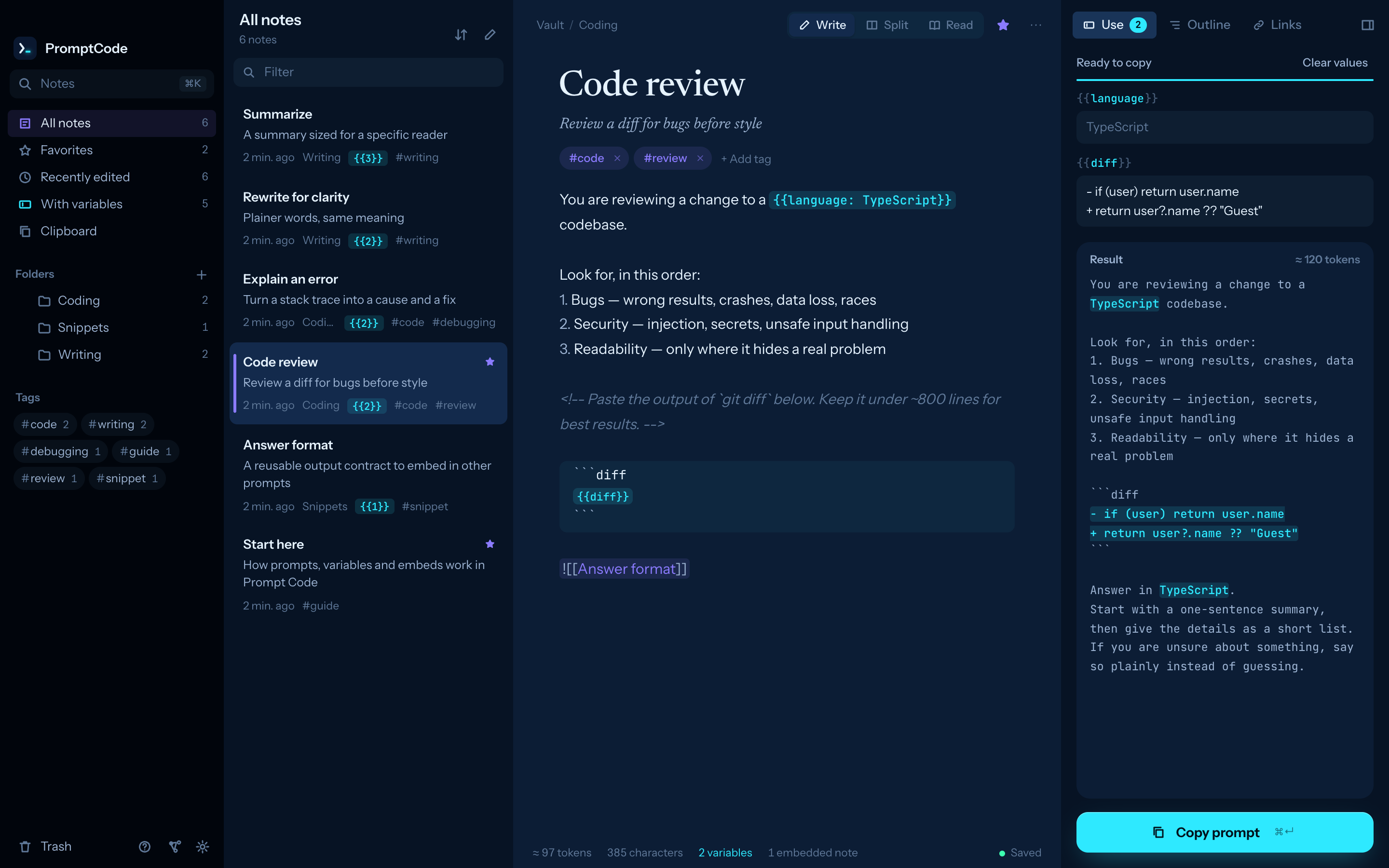
Three small additions to Markdown turn a note into something you fill in and copy. Everything else is plain Markdown.
Explain {{topic}} to
{{audience: engineers}} in a
{{tone: friendly | formal}} tone.
Variables
Plain fields, defaults, or a list of choices. The Use panel turns them into inputs and shows the finished prompt as you type. ⌘↵ copies it.
Review this pull request.

![[Answer format]]
Embeds
Keep a persona or an output contract in one note and pull it into any prompt. It is filled in when you copy.
Summarize the meeting.
<!-- works better with
     the transcript first -->
Notes to yourself
HTML comments stay in the file and are removed on copy, so the model never sees them.
02 / Quick paste
Your prompts, in whatever app you are typing.
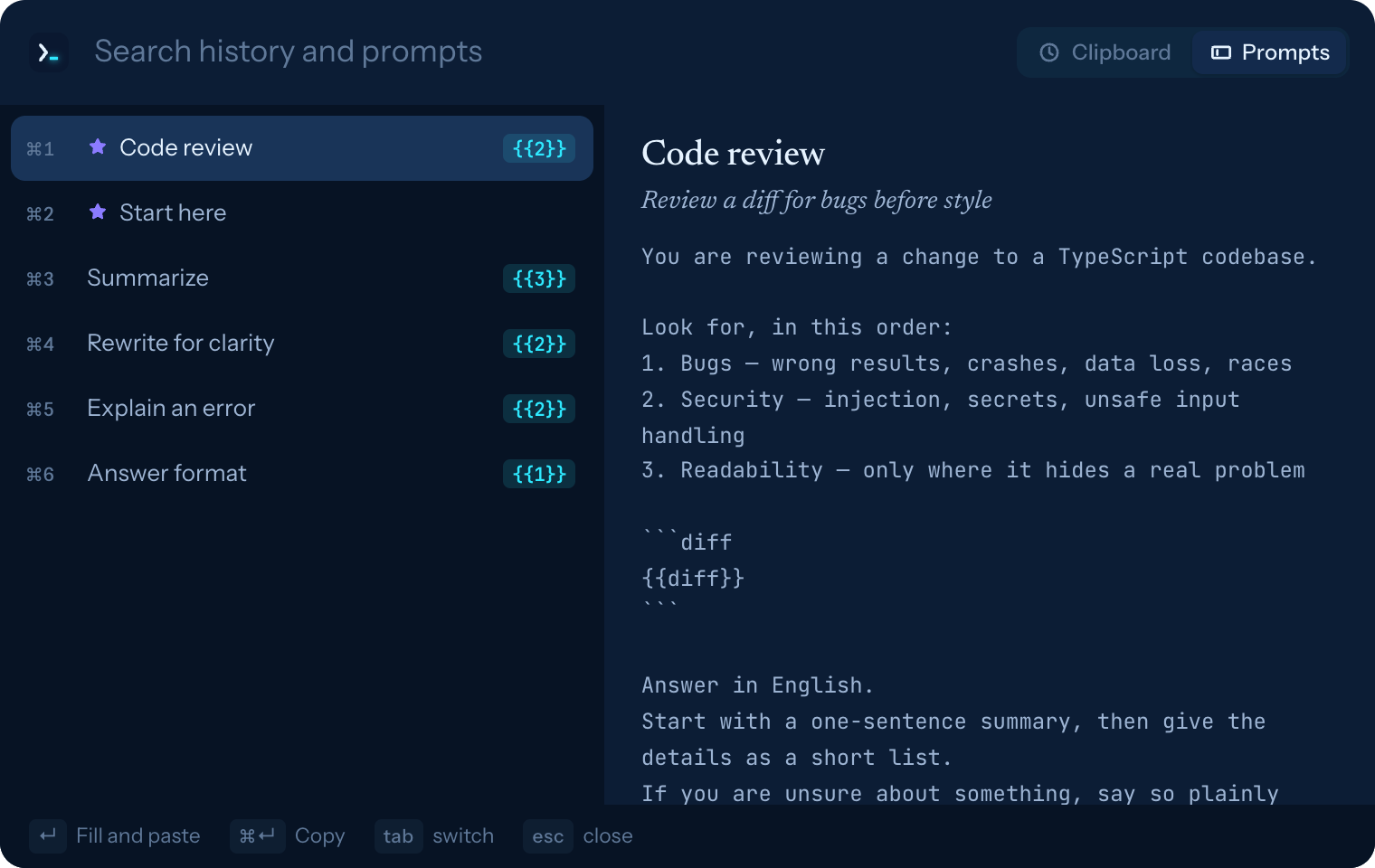
Press ⌥⌘V anywhere. A small window shows your clipboard history and your prompts. Pick one and it is pasted where you were typing.
- Fill in first. Prompts with variables let you enter the values right there before pasting.
- Clipboard history in the menu bar. Keeps the last 200 copies. Copies that password managers mark as concealed are never recorded.
- Keyboard all the way. ↵ pastes, ⌘↵ only copies, ⌘1–⌘9 paste a row.
03 / Features
The good parts of a notes app
and a snippet manager.
Links, backlinks, a graph and a command palette for writing. Folders, tags, favorites and one-click copy for reuse.
Links and tags
[[Note]] links with autocomplete, backlinks, #tags and a graph view. Renaming a note rewrites links to it.
Fast navigation
⌘K jumps to any note, > runs commands, ⇧⌘F searches the text of every note.
Your files, as they are
A vault is a folder of .md files with YAML frontmatter. Edit them in any app and the changes show up live.
Write and read
A Markdown editor with highlighted code blocks, and a reading view you switch to with ⌘E.
Nothing leaves your Mac
No account, no telemetry, no network requests. Deleted notes go to .trash/ inside the vault.
Small and native
About 12 MB on disk. Built with Tauri on the system WebKit. Light and dark themes, five accents, English and Japanese.
04 / Keys
Kept under your fingers.
| ⌥⌘V anywhere | Quick paste (change it in Settings) |
| ⌘K | Jump to a note, > for commands |
| ⌘N / ⇧⌘N | New note / new folder |
| ⇧⌘F | Search every note |
| ⌘↵ | Fill variables; inside the panel, copy |
| ⇧⌘C | Copy with current values |
| ⌘E | Switch between write and read |
| ⌘\ | Hide or show the sidebars |
| ⌘G | Graph |
| ⌘D | Duplicate note |
| ⌘⌫ | Move note to trash (undo from the toast) |
| ⌘, | Settings |
05 / Download
Get Prompt Code.
Choose the DMG for your Mac, open it, and drag Prompt Code into Applications. A short guide opens on first launch.
- Signed with a Developer ID and notarized by Apple, so it opens without warnings. Requires macOS 11 or later.
- To paste into other apps, macOS asks you to allow Prompt Code under System Settings › Privacy & Security › Accessibility. Without it, quick paste still copies the text for you to paste with ⌘V.
- Closing the window keeps Prompt Code in the menu bar. Quit from the menu bar menu or with ⌘Q.
Build from source
git clone https://github.com/karamage/prompt-code.git
cd prompt-code
bun install
bun run app:build   # → src-tauri/target/release/bundle/macos/
06 / FAQ
Questions.
- Where are my prompts stored?
- In a folder of Markdown files,
~/PromptCodeby default; pick another one in Settings. You can back it up, sync it, or put it in git like any other folder. - Does it send my prompts anywhere?
- No. Prompt Code has no account and no telemetry, and it makes no network requests. Its local server only listens on
127.0.0.1and requires a token generated at launch. - Can I use it with my Obsidian vault?
- It reads plain
.mdfiles with YAML frontmatter and[[links]], so you can choose any folder of Markdown notes as the vault in Settings (⌘,). - Which AI tools does it work with?
- Any of them. Prompt Code copies or pastes finished text, so it works with chat apps, IDEs, terminals and browsers alike.
- How much does it cost?
- Nothing. It is open source under the MIT License.